

Mobile Number Status Query API Integration Instructions
This document will introduce a Mobile Number Status Query API integration guide, which can be used to verify the status of a mobile number. You can input a mobile number for querying.
¶ Application Process
To use the Mobile Number Status Query API, first go to the 辰汐ai Console to obtain your API Token for future use.

If you are not logged in or registered, you will be automatically redirected to the login page inviting you to register and log in. After completing this, you will be automatically returned to the current page.
One API Token can call all services on the platform, no need to apply separately for each service. The first application will grant a free quota for a trial experience; when the quota is insufficient, you can recharge the general balance in the console.
📘 Complete documentation: Mobile Number Status Query API →
¶ Basic Usage
First, understand the basic usage method, which is to input the mobile number to obtain the processed result. You need to simply pass a mobile field. We can then fill in the corresponding content on the interface, as shown in the figure:
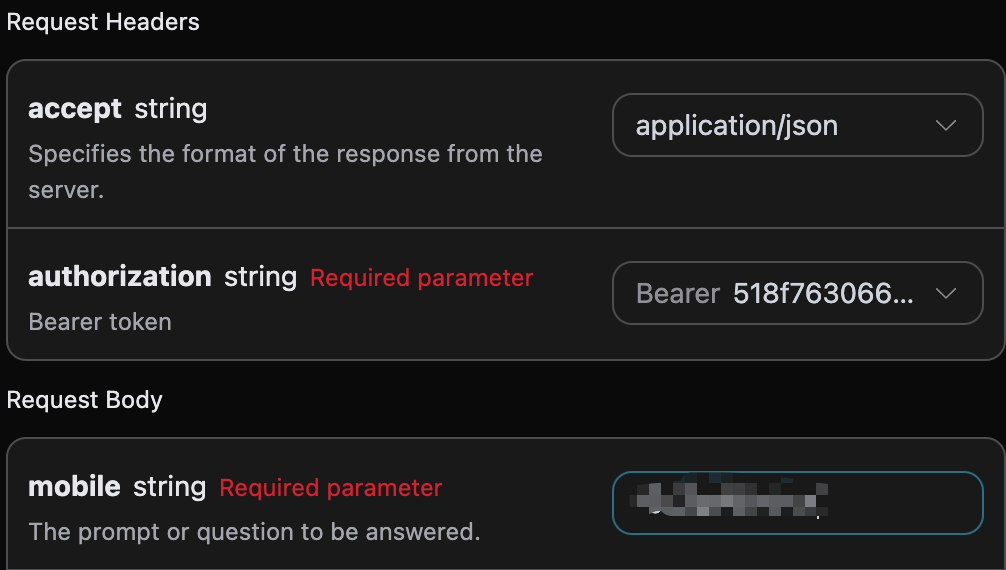
Here we can see that we have set the Request Headers, including:
accept: the format of the response result you want to receive, filled in asapplication/json, which is in JSON format.authorization: the key to call the API, which can be directly selected after application.
Additionally, we set the Request Body, including:
mobile: the mobile number to be processed, which is a required parameter.encryption: optional, sensitive field encryption parameter (if you need to send encrypted data).
After selection, you can find that the corresponding code is also generated on the right side, as shown in the figure:
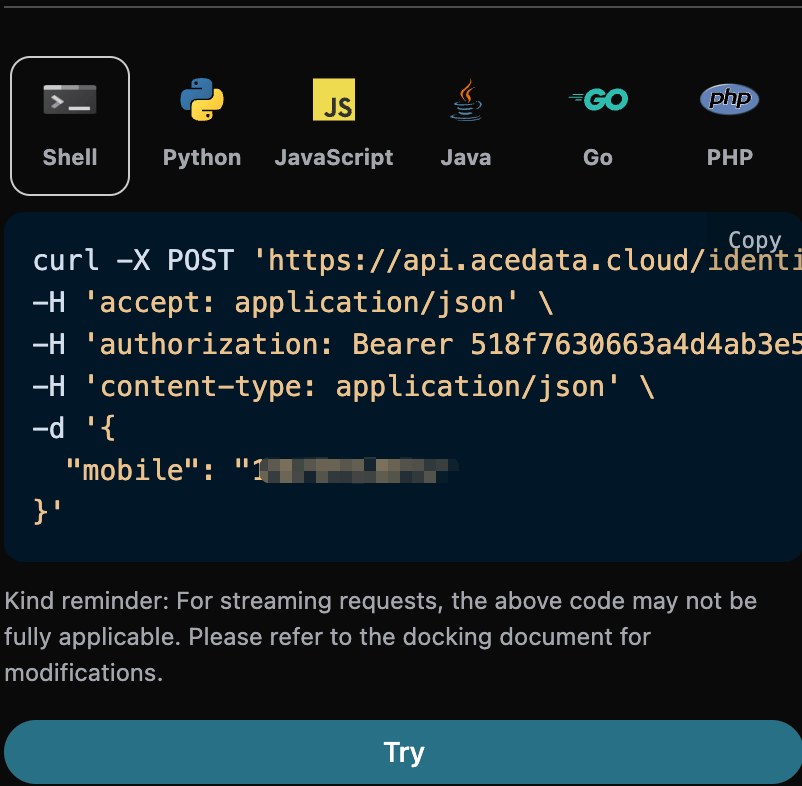
Click the "Try" button to perform a test, as shown in the above figure, we obtained the following result:
{
  "result": "0",
  "description": "Success",
  "status_code": 0
}
The returned result contains multiple fields, described as follows:
result, the authentication result code, with the charging situation as follows.- Charging result codes:
- 0: Success
- Non-charging result codes:
- -1: No result found
- -2: Mobile number format is incorrect
- -3: Verification center service is busy
- Charging result codes:
description, business result description.status_code, status code:- 0: Normal
- 1: Suspended
- 2: Canceled
- 3: Invalid number
- 4: Not in the network
- 99: Unknown status
It can be seen that the status of this mobile number has been queried.
Additionally, if you want to generate the corresponding integration code, you can directly copy it, for example, the CURL code is as follows:
curl -X POST 'https://api.acedata.cloud/identity/phone/check-1e' \
-H 'accept: application/json' \
-H 'authorization: Bearer {token}' \
-H 'content-type: application/json' \
-d '{
  "mobile": "***"
}'
The Python integration code is as follows:
import requests

url = "https://api.acedata.cloud/identity/phone/check-1e"

headers = {
    "accept": "application/json",
    "authorization": "Bearer {token}",
    "content-type": "application/json"
}

payload = {
    "mobile": "***"
}

response = requests.post(url, json=payload, headers=headers)
print(response.text)
¶ Error Handling
When calling the API, if an error occurs, the API will return the corresponding error code and message. For example:
400 token_mismatched: Bad request, possibly due to missing or invalid parameters.400 api_not_implemented: Bad request, possibly due to missing or invalid parameters.401 invalid_token: Unauthorized, invalid or missing authorization token.429 too_many_requests: Too many requests, you have exceeded the rate limit.500 api_error: Internal server error, something went wrong on the server.
¶ Error Response Example
{
  "success": false,
  "error": {
    "code": "api_error",
    "message": "fetch failed"
  },
  "trace_id": "2cf86e86-22a4-46e1-ac2f-032c0f2a4e89"
}
¶ Conclusion
Through this document, you have learned how to use the Mobile Number Status Query API to verify the status of a mobile number. You can input a mobile number for querying. We hope this document can help you better integrate and use this API. If you have any questions, please feel free to contact our technical support team.